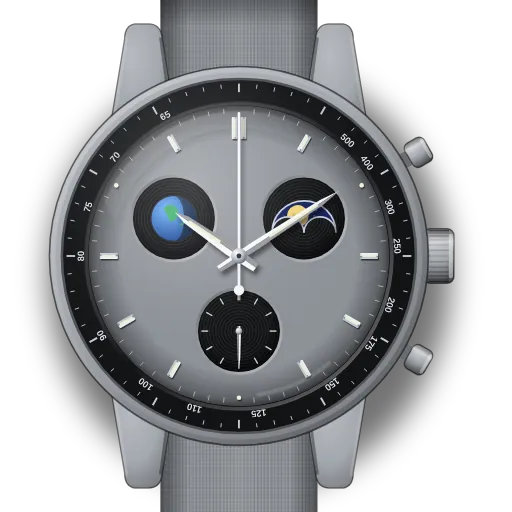
How to set up the MoonSwatch Mission to Earthphase
Short answer: Pull the crown two clicks to C. The bottom pusher moves the moon and Earth discs together, and the top pusher moves the Earth disc alone. Set the moon to tonight first, then correct the Earth. It should look dark when the moon is full.
Mission to Earthphase at a glance
| Reference | SO33M700 |
|---|---|
| What's unique | The only MoonSwatch with an Earth phase: the Earth as seen from the Moon |
| Earth vs moon | The two phases are opposite. Full moon = "new Earth" (dark), new moon = full Earth. |
| Crown | A / B / C. Both discs are set at C. |
| Pushers at C | Bottom: moon and Earth together. Top: Earth alone. |
| Dial | Grainy grey dial with UV-ink oceans and oversized luminous moons. Black tachymeter. |
| Battery cover | The Moon with Neil Armstrong's footprint |
What do you need to set on the Mission to Earthphase?
Set up moon phase on the MoonSwatch Mission to Earthphase
- 1
Pull the crown fully out
Two clicks, to position C. Both phase discs are now on the pushers.
- 2
Bottom pusher: forward to tonight
Hold the bottom pusher. It moves the moon and Earth discs together. Stop when the moon matches tonight.
- 3
Push the crown back in
Back to A. If the Earth disc looks wrong, use "Earth phase wrong".
Set up Earth phase on the MoonSwatch Mission to Earthphase
N is the number of whole days since the last full moon. The interactive guide works it out for your location and today's date, and shows the exact count.
- 1
Pull the crown fully out
Two clicks, to position C.
- 2
Bottom pusher: moon to FULL
Hold the bottom pusher (moves moon and Earth together) until the full moon is centred.
🎯 Full moon centred - 3
Top pusher: Earth alone until dark
At full moon, Earth seen from the Moon is "new". Hold top until the Earth disc is dark.
- 4
Bottom pusher: forward to tonight
Hold bottom again until the moon matches tonight. Earth follows.
- 5
Push the crown back in
Back to A.
Set the time on the MoonSwatch Mission to Earthphase
- 1
Pull the crown fully out
Two clicks, to position C.
- 2
Turn to set the time
Turn either way until the hands match your clock.
- 3
Push the crown back in
Back to position A. Done.
What owners run into
- The discs move in tiny steps and there is no click per day, so set them by eye against a moon phase picture for tonight.
- If the Earth looks full when the moon is full, the two discs are out of step. Fix it with the top pusher alone ("Earth phase wrong" below).
- Using the top pusher to set the moon moves only the Earth disc. Start with the bottom pusher.
How the Mission to Earthphase differs from similar watches
Unlike the Mission to the Moonphase, there are two phase discs and both pushers set them, at crown C rather than III. The 2025 Moonshine Gold Earthphase editions use the same layout.
Quick answers
Why is the Earth dark when the moon is full?
At full moon the Sun lights the side of the Moon facing us, so from the Moon the Earth's night side faces you. The watch shows that, which is why the two discs run opposite.
Which pusher moves only the Earth on the Earthphase?
The top pusher, with the crown pulled out to C.
How do I check the Earth disc is right?
Look at it next to the moon: when the moon is full the Earth should be dark, and when the moon is new the Earth should be full. If not, hold the top pusher at C until it is.