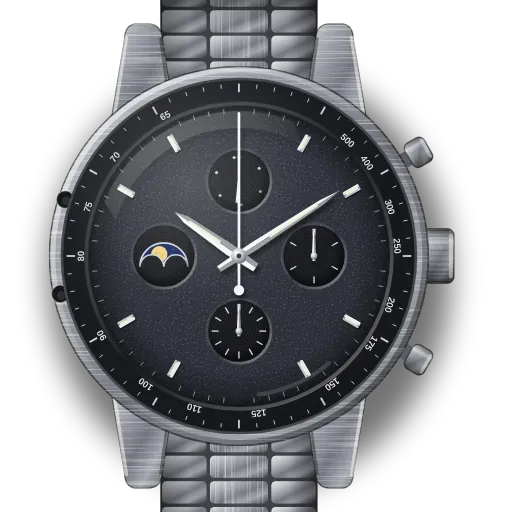
How to set up the legacy Omega Speedmaster Professional Moonphase (calibre 1866)
Short answer: First move the hands to about 6 o'clock: Omega says not to use the correctors while the hands are between 7 and 12, morning or evening. Then press corrector D to bring the full moon to the centre and once more per day since, and press corrector C to set the date.
Speedmaster Professional Moonphase (legacy, hand-wound) at a glance
| Reference | 3876.50.31 (42 mm) |
|---|---|
| Calibre | 1866, hand-wound, no stop-seconds |
| Correctors | C = date, D = moon. Use a soft stylus. |
| Danger zone | Hands between 7 and 12 o'clock, AM or PM: don't press the correctors |
| Crown | Two positions: 1 = winding, 2 = time |
What do you need to set on the Speedmaster Professional Moonphase (legacy, hand-wound)?
Set up moon phase on the Omega Speedmaster Professional Moonphase (legacy, hand-wound)
N is the number of whole days since the last full moon. The interactive guide works it out for your location and today's date, and shows the exact count.
- 1
Move the hands out of 7–12
Before correcting, crown to 2 and set the hands to about 6:00.
⚠️ Avoid 19:00–00:00 on the dial. The date and moon mechanism is engaged then. Move the hands out of that window first (for example to 6:30), or wait.⚠️ Avoid 07:00–12:00 on the dial. The date and moon mechanism is engaged then. Move the hands out of that window first (for example to 6:30), or wait. - 2
Corrector D: to FULL moon
Press with the stylus until the full moon is centred.
🎯 Full moon centred - 3
Corrector D: N more presses
One press per day since the last full moon.
- 4
Set the time back
Crown to 2, set the correct time, push in.
Set up the date on the Omega Speedmaster Professional Moonphase (legacy, hand-wound)
- 1
Move the hands out of 7–12
Crown to 2, set about 6:00.
⚠️ Avoid 19:00–00:00 on the dial. The date and moon mechanism is engaged then. Move the hands out of that window first (for example to 6:30), or wait.⚠️ Avoid 07:00–12:00 on the dial. The date and moon mechanism is engaged then. Move the hands out of that window first (for example to 6:30), or wait. - 2
Corrector C: date
Press until the date is right. Don't set the date by spinning the hands past midnight.
- 3
Set the time back
Crown to 2, set the time, push in.
Set the time on the Omega Speedmaster Professional Moonphase (legacy, hand-wound)
- 1
Pull to position 2
Turn either way to set hours and minutes.
- 2
No stop-seconds: hold it gently
To sync the seconds, turn the crown gently backwards and keep light pressure so the seconds hand pauses. Release on the beat, push to 1.
Based on Omega's published manual: this calibre has no stop-seconds function.
Start a stopped watch on the Omega Speedmaster Professional Moonphase (legacy, hand-wound)
- 1
Wind it
Crown in (1). Turn forwards until it stops. Never force it.
- 2
Pull to position 2
Turn either way to set hours and minutes.
- 3
No stop-seconds: hold it gently
To sync the seconds, turn the crown gently backwards and keep light pressure so the seconds hand pauses. Release on the beat, push to 1.
Based on Omega's published manual: this calibre has no stop-seconds function.
What owners run into
- Pressing a corrector at 9 or 10 o'clock, when the calendar is engaged, is the classic way to damage these movements. Check the hands first.
- Setting the date by spinning the hands through midnight is slow and not recommended. Use corrector C.
- Use plastic or wood to press the correctors. A metal pin can scratch the case.
How the Speedmaster Professional Moonphase (legacy, hand-wound) differs from similar watches
Unlike the Speedmaster Moonphase 9904, the moon and date are set with recessed correctors, not the crown, and the movement is hand-wound without stop-seconds, like the 1861.
Quick answers
Why can't I use the correctors between 7 and 12 o'clock?
Omega's instructions rule it out. That is when the calendar change is under way, and pressing a corrector then can damage it.
Which corrector sets the moon on the Speedmaster 1866?
Corrector D. Corrector C sets the date.