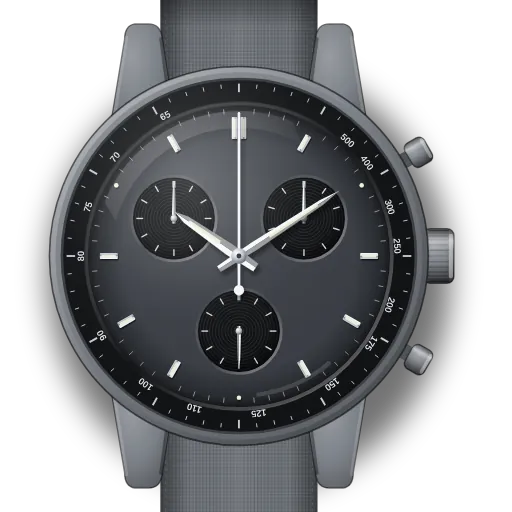
How to set up a MoonSwatch (Mission to Mercury and the other planet models)
Short answer: Pull the crown two clicks to C and turn it to set the time. If a chronograph hand stops short of zero, pull the crown to B: the top pusher moves the 1/10 s hand and the bottom pusher the big seconds hand. Then go to C and use the top pusher for the minute counter.
Mission to Mercury at a glance
| Movement | Swatch quartz chronograph, battery powered. Swatch does not publish a calibre number. |
|---|---|
| Crown | Three positions: A (pushed in), B (one click), C (two clicks) |
| Pushers | Top: start and stop. Bottom: reset, or split time while the chronograph runs. |
| Sub-dials | 60-minute counter at 10 o'clock, 1/10 second counter at 2, running seconds at 6 |
| Case | 42 mm Bioceramic: two-thirds ceramic, one-third material derived from castor oil |
| Date or moon? | Neither, so there is no late-night window to avoid |
| Launched | March 2022, as 11 models. Each battery cover shows its own planet. |
What do you need to set on the Mission to Mercury?
Reset chronograph hands on the MoonSwatch Mission to Mercury
- 1
Test first
Crown in (A). Press top to start and stop, then bottom to reset. If every hand lands on 12, you're done.
- 2
Pull the crown to B
One click out.
- 3
Top pusher: 1/10 hand to 0
Tap until the hand at 2 o'clock points to 0. Hold to go faster.
- 4
Bottom pusher: seconds hand to 12
Tap or hold until the big chrono hand points to 12.
- 5
Crown to C, top pusher: minutes
Pull fully out. Tap top until the hand at 10 o'clock points to 60.
- 6
Push in and test
Crown to A. Start, stop, reset. All hands land on zero.
🎯 All chrono hands at zero ✓
Reset the chronograph counter on the MoonSwatch Mission to Mercury
- 1
Reset the chronograph
Crown in (A). Stop it if it's running, then press bottom to reset.
- 2
Pull the crown fully out
Two clicks, to position C.
- 3
Top pusher: minute counter to 60
Tap until the hand at 10 o'clock points to 60.
- 4
Push in and test
Crown to A. Start, stop, reset. If the big seconds hand is off too, use "Chrono hand not at 12".
🎯 Minute counter at zero ✓
Set the time on the MoonSwatch Mission to Mercury
- 1
Pull the crown fully out
Two clicks, to position C.
- 2
Turn to set the time
Turn either way until the hands match your clock.
- 3
Push the crown back in
Back to position A. Done.
What owners run into
- After a battery change or a hard knock, the chrono seconds hand can reset to a point just before or after 12. The quartz motor has lost track of where the hand is. It is not broken: the re-alignment below puts it back.
- The bottom pusher pressed while the chronograph is running doesn't reset it. It freezes the display for a split time and the hands catch up when you press it again. Press the top pusher to stop, then the bottom one to reset.
- At B and C the pushers adjust hands instead of running the chronograph. Always finish with the crown pushed back in to A.
- The 1/10 second hand at 2 o'clock is part of the chronograph. It is not a second time zone or a running seconds hand.
How the Mission to Mercury differs from similar watches
All 11 planet models share the same movement, buttons and dial layout. Only colours and details change. So one guide covers all of them, and the model list below links each one. The Mission to the Moonphase, Pink and Super Blue Moonphases and the Mission to Earthphase are different. They have a moon disc where the 1/10 s counter sits here, label the crown I/II/III or use other pusher roles, and are set up differently.
Models covered by this guide
Quick answers
Which MoonSwatch models does this guide cover?
All 11 planet models from 2022: Sun, Mercury, Venus, Earth, Moon, Mars, Jupiter, Saturn, Uranus, Neptune and Pluto (SO33J100 to SO33M101). They use the same movement and crown positions.
Why doesn't my MoonSwatch chrono hand return to 12 after reset?
The hand position memory was knocked out of step, usually by a battery change or a drop. Pull the crown to B and tap the bottom pusher until the hand is on 12, then push the crown back to A.
Can I reset the chrono without opening the watch?
Yes. The whole re-alignment is done with the crown and the two pushers. No tools needed.